Early accessInvite-only · Set up with the Atona team

Brand Deals Manager

Checks each brand offer against your rate card, flags risky contract clauses with a suggested fix, drafts your reply for approval, and reminds you of deliverables and invoices.

  • Reports to you, under the name you give it
  • Business workspace
  • Your connected business inbox
  • Phone: none

See it work, start to finish

Answer Nomad Coffee’s offer

  1. You assign · Setup

    “Check every offer against my rate card, and flag anything in a contract I should push back on.”

  2. Heard backNomad Coffee sent an offer and a contractOne Reel and three Stories, with usage rights “in perpetuity”.
  3. DidChecked it against your rate cardThe fee clears your Reel floor. The usage terms don’t.
  4. DidFlagged the contractPerpetual usage at the base fee, and unpaid whitelisting. Suggested fix: 12 months, whitelisting priced separately.
  5. Asked youDrafted your reply and held it for youThe approval card shows the draft, Why, Risks, Mitigations and Sources.
  6. DoneYou approved; the reply went out from your inboxNomad Coffee agreed to 12 months the next day. The deal moved to contracting.
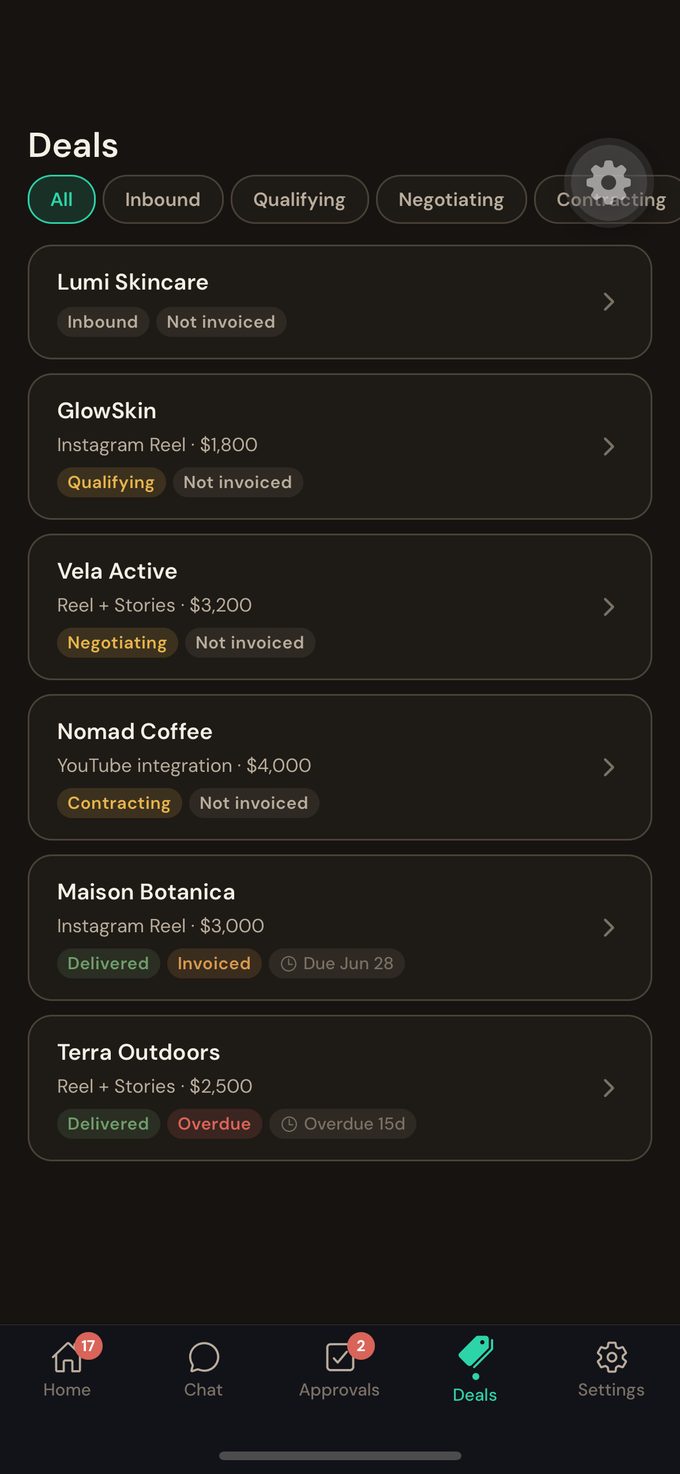
  7. Reports back · DealsNomad Coffee: contracting
    • Usage limited to 12 months
    • Reel due on the 24th: reminder set
    • Invoice alert set for the due date

An illustrative scenario. The approval card and the deal list are real captures from Atona’s creator workspace, with example data.
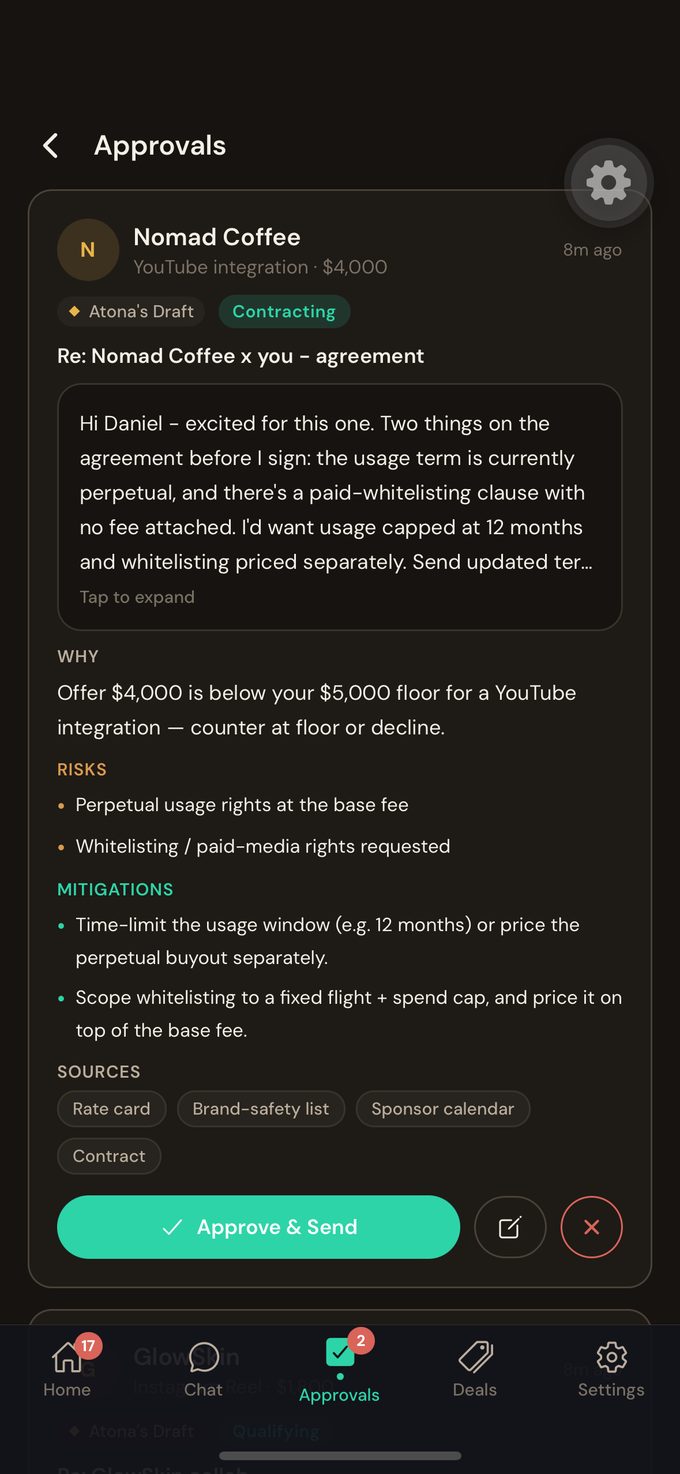
An Atona approval card for a brand-deal reply to Nomad Coffee: the draft, then Why, Risks, Mitigations and Sources, with Approve & Send.

An Atona approval card for a brand-deal reply to Nomad Coffee: the draft, then Why, Risks, Mitigations and Sources, with Approve & Send.Atona for iOS · example data

The brand-deal pipeline in Atona: deals filtered by Inbound, Qualifying, Negotiating and Contracting, each with its stage and invoice status.

The brand-deal pipeline in Atona: deals filtered by Inbound, Qualifying, Negotiating and Contracting, each with its stage and invoice status.Atona for iOS · example data

What it owns

5 available today · 1 in early access · 1 planned

Checks each inbound offer against your rate card.Every offer
Drafts the reply in your voice for your approval, and never quotes a number you haven’t set.Every offer
Flags four kinds of clause before you sign: whitelisting, perpetual usage, paid amplification and exclusivity, each with a suggested fix.Every contract
Reminds you of deliverables and their deadlines.Before each is due
Tells you when an invoice is due or overdue.On the due date

Not available yet

Drafts the payment chase to the brand for your approval.Early access
Pulls your audience numbers from Instagram, YouTube and TikTok.Planned

Offer checks, contract flags, reply drafts, deliverable reminders and invoice alerts work today. Drafting the payment chase to the brand is in early access; pulling analytics is planned.

Things you can hand it

  • “Check every offer against my rate card before I see it.”
  • “Flag anything in the Nomad Coffee contract I should push back on.”
  • “Tell me when GlowSkin’s invoice goes overdue.”

What you get back

  • An approval card for every offer: the draft, why, risks, fixes and sourcesAs offers arrive
  • Contract flags with a suggested fixWhen a contract arrives
  • Deliverable and deadline remindersBefore each is due
  • An alert when an invoice is due or overdueOn the due date

What it does alone, and what waits for you

On its own

  • Checks offers against your rate card
  • Flags risky clauses
  • Tracks deliverables and invoice dates

Waits for your approval

  • Every reply, before it sends

Brings to you

  • An offer below your floor
  • A clause on its risk list
  • An overdue invoice

Limits

  • Never quotes a number you haven’t set
  • Doesn’t sign, redline or agree terms on its own
  • Never moves money

Default controls for this role. Every reply waits for your approval. It reads the business inbox you connect in full, contracts and invoices included, because brand mail is the job; connect the inbox you use for deals, not your personal one.

How every employee is supervised: security and controls.

What it needs to start

You connect

  • The Gmail inbox you use for brand deals

Atona sets up

  • A business workspace for your deals
  • Onboarding with the Atona team

You teach it

  • Your rate card
  • Your tone, through the edits you make

How it reaches people. Replies go out from the business inbox you connect, as you, after you approve each one.

Accounts and channels

  • Gmail
  • Google & Microsoft calendar
  • Instagram, YouTube & TikTok analyticsplanned

How each part works: Email · Workflows · Tasks

Work samples

An Atona approval card for a brand-deal reply to Nomad Coffee: the draft, then Why, Risks, Mitigations and Sources, with Approve & Send.

An Atona approval card for a brand-deal reply to Nomad Coffee: the draft, then Why, Risks, Mitigations and Sources, with Approve & Send.Atona for iOS · example data

Every money-bearing reply waits on one card: the draft, then Why, Risk, Mitigation and Sources.Atona for iOS · example data
The brand-deal pipeline in Atona: deals filtered by Inbound, Qualifying, Negotiating and Contracting, each with its stage and invoice status.

The brand-deal pipeline in Atona: deals filtered by Inbound, Qualifying, Negotiating and Contracting, each with its stage and invoice status.Atona for iOS · example data

Every deal in one place, from inbound to paid, with its stage and invoice status.Atona for iOS · example data

Work history

No work history yet. The Brand Deals Manager is in early access, and its record starts with the first early-access customers.

Before you hire

What does early access mean?

Offer checks, contract flags, reply drafts, deliverable reminders and invoice alerts work today. Drafting the payment chase to the brand is in early access; pulling analytics is planned. Request access, mention the Brand Deals Manager, and the Atona team sets it up with you once you’re approved.

How does it know my rates?

You set your rate card once, and it checks every offer against it. It never quotes a number you haven’t set.

Does it ever send a reply without my approval?

No. Every reply waits for you.

Can it read a contract?

Yes. It flags four kinds of clause that cost creators money: whitelisting, perpetual usage, paid amplification and exclusivity, each with a suggested fix. It doesn’t redline the document, and it never signs.

Does it read financial mail?

It reads the business inbox you connect in full, including contracts and invoices, because that is the job. The sensitive-mail check that protects a personal inbox doesn’t apply there, so connect the inbox you use for brand deals. It never moves money.

Does it pull my analytics?

Not yet; that is planned. Until then it works from the rate card you set.

How do I get access?

Request access from this page. You create an account, then enter an invitation code if you have one, or tell us what you need, mentioning the Brand Deals Manager. The Atona team reviews every request and replies by email.

What happens once I’m in?

The Atona team sets up your Brand Deals Manager with you: the accounts it works in, and the notes and rules it works from.

Request your Brand Deals Manager.

The Brand Deals Manager is in early access. Request access, mention the Brand Deals Manager, and the Atona team sets it up with you once you’re in.

Already have access? Sign in · Android in beta.