Hire a Personal Assistant who handles life admin.
Handles appointments, reservations, reminders, research, and personal communications. It works from its own address and number, so the people it contacts know they are hearing from your assistant. You approve; it records.
Available now·Recommended plan: Standard·Free to start
Handles life admin.
Written as finished work, not features. Each one says which plan it needs.
Books the table, confirms with the group by text, and reminds you an hour before.
Coordinates a group dinner across a week of replies without losing the thread.
Researches the three options and sends a short comparison you can act on.
Keeps personal email tidy: replies to the routine, holds the sensitive, never touches banking or medical.
Texts a friend back on iMessage or WhatsApp from its own number, in your tone.
Calls to move an appointment when your calendar changes, then updates the invite.
Who hires a Personal Assistant
- Parents running a family calendar that lives across three phones and a fridge door.
- Frequent travellers whose confirmations, changes and reminders arrive on five channels.
- Anyone whose personal admin has quietly become a second job.
Its tools and channels
The real app, doing a Personal Assistant’s job.
What it did, what it held for you, and when it asked. Every action is in your record, with the reason for each call.
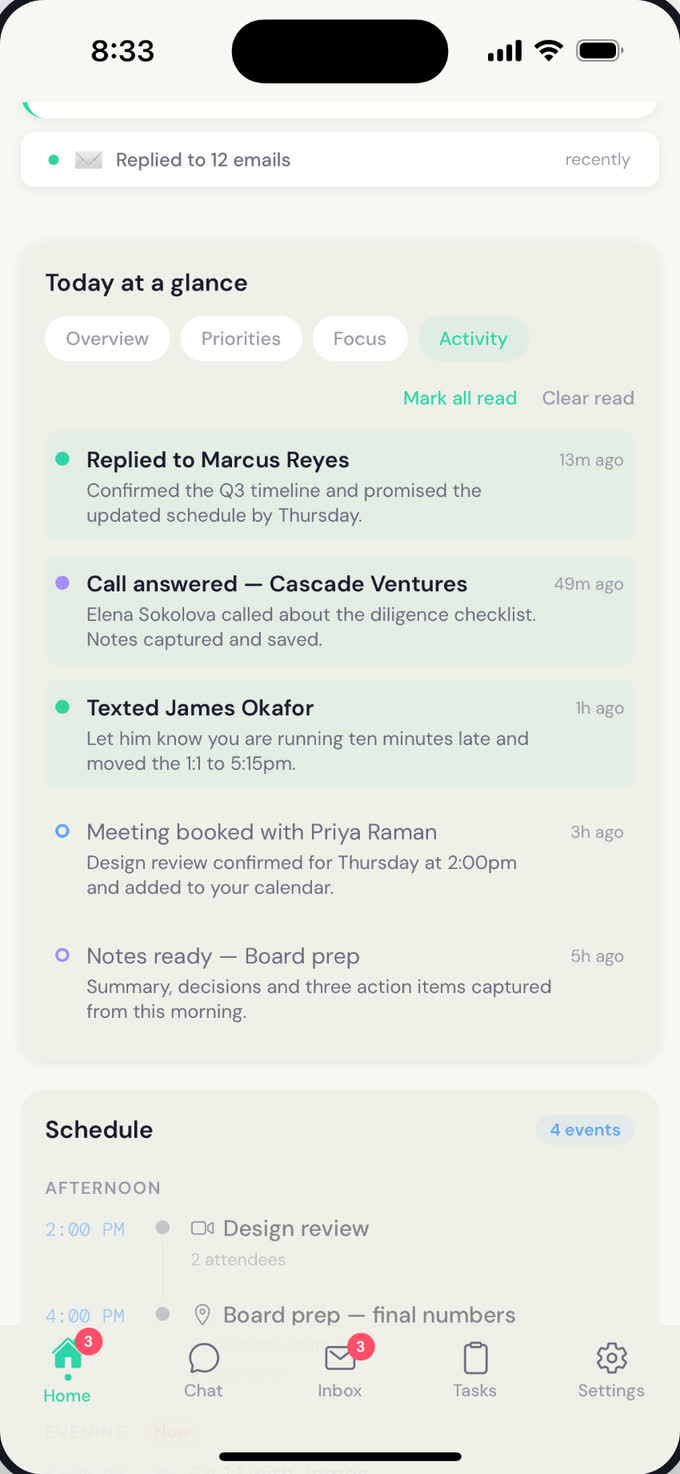
The day’s record: a reply sent, a call answered, a text to say you’re late, a meeting moved.Atona for iOS · example data
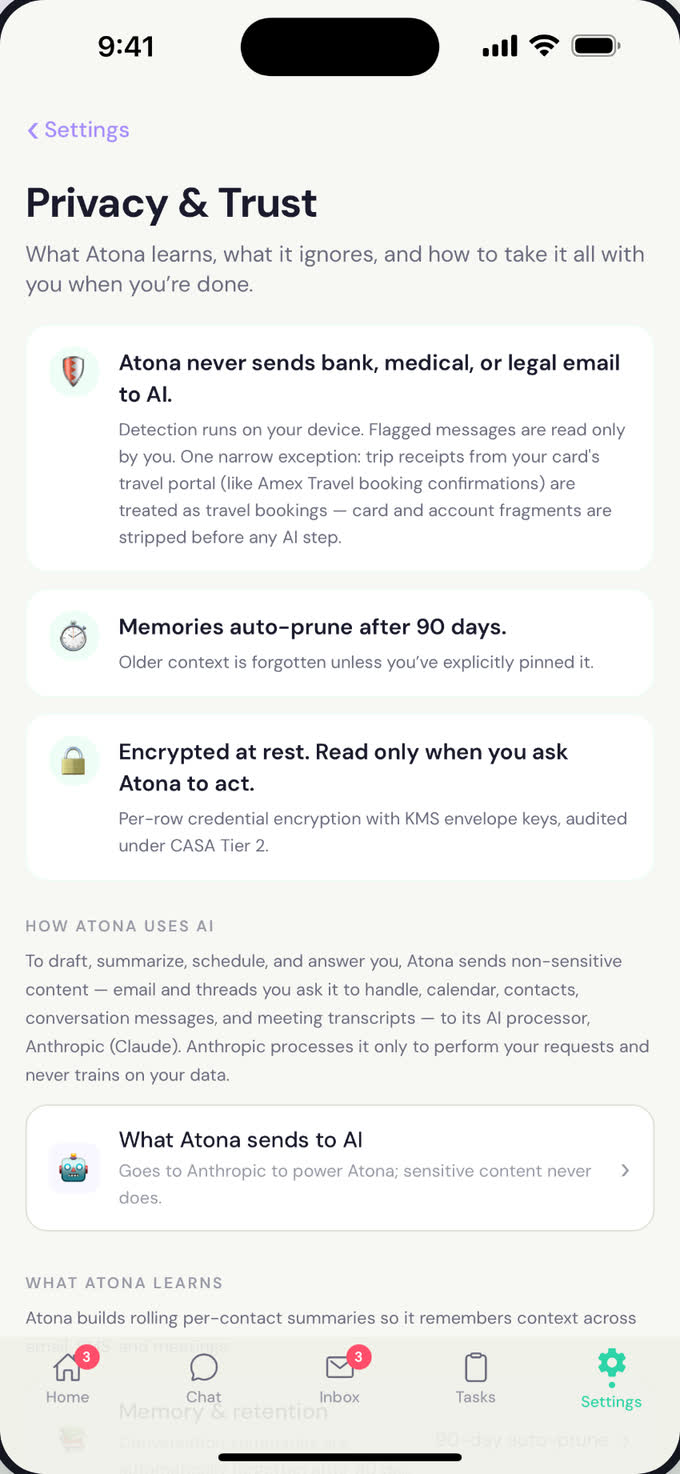
What it never touches: bank, medical and legal email stays out of AI, on every plan.Atona for iOS · example data
Delegate, approve, review
With you
- Chat or forward; it asks before spending money or committing you to a plan.
- Standing preferences like “never before 9am” and “always a table by the window” are kept for good.
- A morning brief with weather, commute, and what it confirmed overnight.
With other Atona employees
- It lives in your Personal workspace with its own identity, separate from work.
- It shares the calendar with an Executive Assistant in your Business workspace so work and life stop colliding.
Default controls for this role. Always asks before any purchase or reservation deposit. Confirms plans with known contacts on its own. Honours your sensitive list without exception. The people it contacts know they are hearing from your assistant, because it writes from its own address and number.
You approve. It records.
Drafts first, then sends
From your own inbox, nothing goes out until you approve it. From its own address it sends when confident and holds the draft when it isn’t.
Its own identity, never yours
A dedicated email address, phone number and WhatsApp, separate from your personal ones. You are CC’d on every message.
Some mail never reaches AI
Anything that looks financial, medical or legal is recognised and held back before it can be sent for processing.
One switch pauses everything
Pause all activity with one toggle, or turn email, texts and calls on and off channel by channel.
A record of every action
Every reply drafted, sent or held is there to review, with the reason it made that call, and a weekly account of time saved.
Every plan works. Standard is the one we’d pick.
Plans set capacity, not the role. We recommend Standard for a Personal Assistant because texts and calls are how personal admin actually gets done.
Personal inbox triage, calendar, research once a week, and the morning brief.
Its own address for confirmations and follow-ups, plus a second inbox.
Its own phone number for texts and calls, iMessage via Mac, and research three times a week. The full Personal Assistant.
WhatsApp, if that is where your life runs, and the most research.
Founders’ pricing through September 30. The discount is already applied.
How each part works
Also hiring: Chief of Staff · Executive Assistant · Recruiter
Before you hire
Will people know they are texting an assistant?
Yes. It writes from its own number and its own address, so the people it contacts know they are hearing from your assistant, not from you. Your personal number stays personal.
Can it spend money?
Not without you. Anything with a deposit or a purchase is held for your approval, every time.
Does it read my banking or medical email?
No. Anything that looks financial, medical or legal is recognised and held back before AI ever sees it.
Which plan do I need?
Start free. Standard is the recommended plan because it adds the phone number for texts and calls, which is where most personal admin happens.
Hire your Personal Assistant today.
Free to start. Working within ten minutes, with a record of every action.
Android coming soon.